
SoftFrog
FrogPad™ is pleased to announce the introduction of FrogPad NoteTaker™ for the iPhone and SoftFrogPad™ for the iPad on the Apple App store. SoftFrog™ is the downloadable software version of a FrogPad keyboard for use on multi touch computers, smart phones, tablets. These SoftFrog apps were developed to work on iPhone and iPad. It is really made for 2 thumbs in portrait mode.
Keep in mind this is really for FrogPad aficionados who have an understanding of FrogPad keyboards. If you do not have a FrogPad keyboard, you can familiarize yourself here: http://www.frogpad.com/support.php
iPad Instructions are immediately below and iPhone Instructions are further down this page.
SoftFrogPad™ iPad Instructions
The De facto standard in one-handed keyboards for multi touch applications.
Frogpad¹s simple and intuitive patented design provides full one handed keyboard functionality for Multi touch iPads. Created with Ergonomics in Mind, it follows the same design of our one handed hardware FrogPad which we have shipped globally since 2003.
Do you Frog? Very soon you will be. It is easy. Within an hour you will be touch-typing.
FrogPad has broken the QWERTY code. FrogPad is a most unique and powerful approach to one handed text intensive data entry. FrogPad replicates keyboard commands that conventionally require two hands to execute. Plus it is easy to learn.
Here are a few things to keep in mind when you are training on Froggy.
Remember that it took a semester (56 hours) to learn to type 40 words-a-minute (WPM) on the standard keyboard. It will take you approximately 15 hours to learn 40 WPM on FrogPad. Some have achieved 40 WPM in 8 hours. The fact is 79% of the typing population hunts and pecks. FrogPad is a natural transition.
Typical human attention span allows one to stick to a tutorial for 10-15 minutes at a time. (Let us know how long it is for Super Humans...) You will be touch-typing within an hour of training.
Two of the unique patented differences of Froggy are the simultaneous key press algorithm and the intuitive letter layout. This makes it fast and easy to learn!
If you do not have a FrogPad keyboard, you can familiarize yourself here:
http://www.frogpad.com/support.php
The following information and screen shots will help you learn a more efficient way to enter data on your iPad.

- Create a new file by pressing the New File key, enter name of file with Apple keyboard
- Save file
- Select All of the current file
- Paste All of the current file
- Lefty/Righty switches from left handed and right handed FrogPad
- ? Instructions on FrogPad web site
Primary Letter Keys
 ......
Left Hand Primary Keys........... Right Hand Primary Keys
FrogPad is a one handed keyboard. You chose lefty or righty. These primary keys will allow you to type 83% of the English language, 90% Japanese, and 80% Latin Languages.
- Place your 3 center fingers on the 3 center keys T H E
- Type ‘the’ using the natural drumming motion a few times
- Place your thumb on the Space key
- Press ‘Space’ between words
- With your index finger press a e I o u a few times
- Look above the ‘t’ find the ‘w’, type ‘what’
- Look above the ‘h’ find the ‘r’ , type ‘where’
- Look below the ‘h’ find the ‘n’, type ‘thin’
- Look below the ‘t’ find the ‘s’, type ‘state’
- Press ‘Shift’ once for single capital letter
- Press ‘Shift’ twice quickly for Caps Lock
Left Handed Function Keys - Thumb on Space Key

Right Handed Function Keys - Thumb on Space Key

- Always ‘Press Twice’ quickly
- Scroll through both pages of ‘symbols’ by pressing symbol
Secondary Letter Keys
 ......
Left Handed FrogPad....................Right Handed FrogPad
To access secondary keys, press and hold ‘space’ with your thumb, press the letter. If you are a FrogPad Aficionado, you will press both space and the letter at the same time once you know the secondary letter position. In primary letter mode, practice simultaneous key press by pressing ‘space’ with thumb and the underlying secondary letter. For instance, press ‘space’ and ‘H’ simultaneously, you will get ‘L’, press ‘space’ and ‘T’ simultaneously you get ‘C’. Remember, you can get to 40 wpm in 15 hours of practice.
Numeric Keyboard
 ......
Left handed Number mode ............Right handed Number mode
- Press ‘Num’ for single number
- Press ‘Num’ twice quickly for Num Lock
Primary Symbols
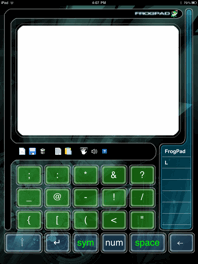 ......
- Press Symbol key for first screen of symbols, press again for the second page of symbols
- Press Symbol key for first screen of symbols, press twice quickly to lock first symbol page to input multiple symbols
- When in first page of Symbol mode, press ‘space’ with thumb to get second page of symbols
Secondary Symbols
 ......
- In ‘symbol’ mode press ‘space’ with thumb to get to secondary symbols
You can download these SoftFrog iPad instructions in pdf format here.
How does the Pill work?
The Pill will allow you access to primary and secondary symbols and numbers all from the primary letter keypad without scrolling to the necessary keypad. To activate this select the letter corresponding to the number or symbol you wish to type and drag it towards the center of the keypad. The Pill will appear. Without removing your finger, slide up or down to select the number or symbol you need. It will be highlighted in a blue circle. release your finger and that number or symbol will be typed. You can also glide your finger further to the right to add a quick space, or further to the left to backspace.
If you have a question about using your FrogPad NoteTaker or a suggestion to improve its functionality please email us at questions@frogpad.com. Enhancements on future versions will be driven by user input.

